View
Open a file, a directory, or a patch with tooee view, and force a renderer.
tooee view README.mdView opens the file, picks a renderer from the extension, and puts the file name in the title bar. Move with j and k, search with /, quit with q. The full key list is in Keyboard basics.
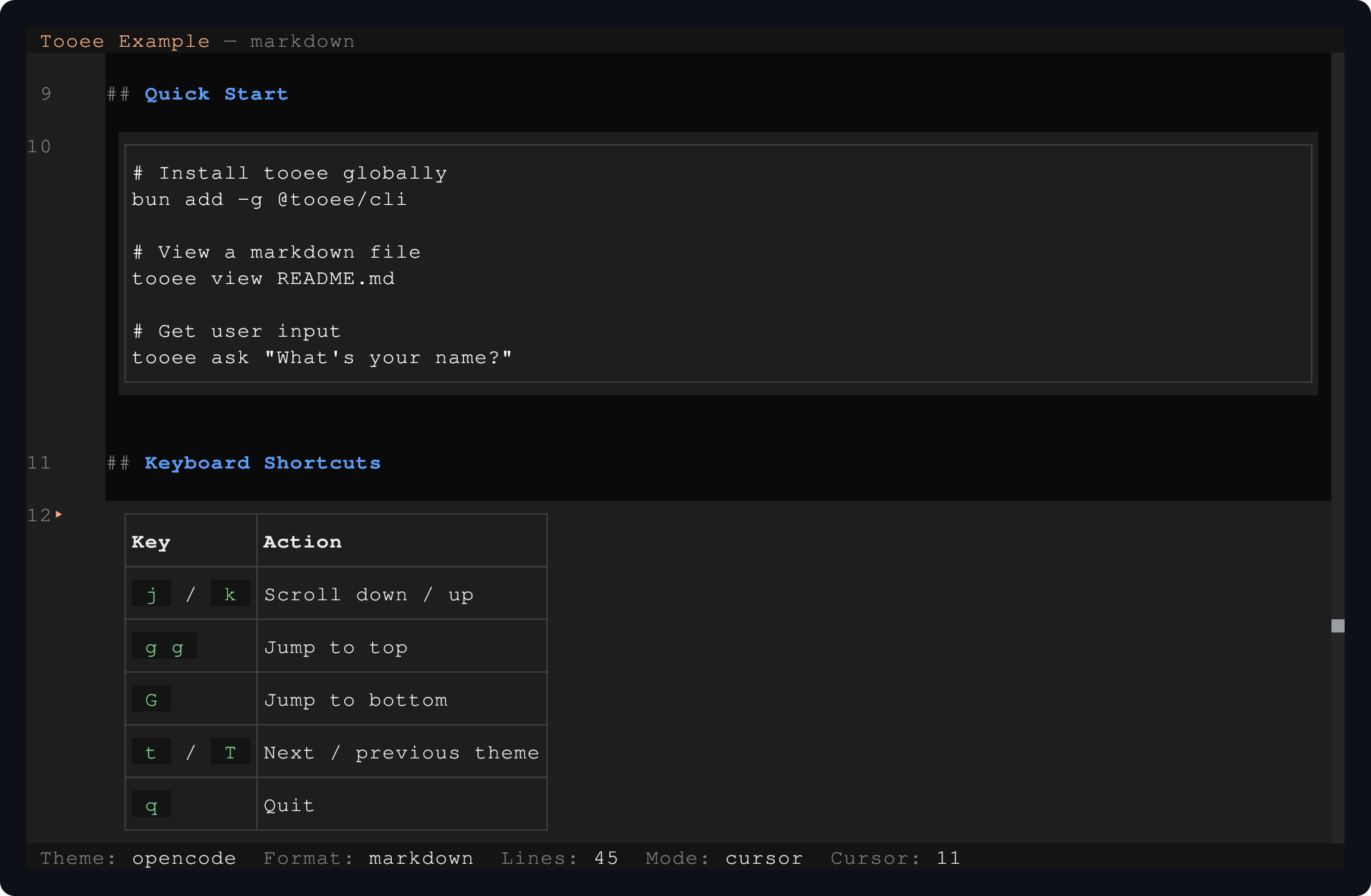
View renders Markdown code blocks and tables with cursor navigation.
Open a file
The extension picks the renderer:
| Extension | Renderer |
|---|---|
.md, .mdx, .markdown | markdown |
.csv, .tsv | table |
.diff, .patch | diff |
.png, .jpg, .jpeg, .gif, .webp | image |
.ts, .tsx, .js, .jsx, .json, .py, .rs, .go, .rb, .java, .kt, .swift, .c, .h, .cpp, .hpp, .css, .html, .sql, .sh, .bash, .zsh, .toml, .yaml, .yml | code, with syntax colours for .ts, .tsx, .js, .jsx |
| anything else | text |
A file with another extension that contains a unified patch, with diff --git or --- and +++ headers and at least one @@ hunk, opens as a diff.
Markdown files resolve relative image paths from the folder of the file. L toggles line numbers. When the cursor is on a wide code block inside markdown, h and l scroll that block sideways.
Follow local links
In a Markdown file, click a link to a local file, or put the cursor on its line and press Enter. View opens the linked file in the same session. When the line holds more than one link, Enter opens a chooser that lists each link by its text and destination. Backspace in cursor mode returns to the previous file, and so does Go back in the : palette.
A link with a fragment, such as install.md#bun, opens at the top of the file. A link to a missing file or a directory shows a warning toast. Other links, such as web URLs, show Unsupported link. Content from stdin has no source file, so its links show Links need a source file. Links in table cells follow the same rules. They also carry an OSC 8 hyperlink, so a terminal with OSC 8 support can open them.
Fold sections
In a Markdown file, the fold keys hide the blocks under a heading. They work in cursor mode:
| Key | Action |
|---|---|
z a | Open or close the fold at the cursor |
z c | Close the fold at the cursor |
z o | Open the fold at the cursor |
z z | Open the fold at the cursor when it is closed, else close it |
z M | Close all folds |
z R | Open all folds |
A heading folds every block up to the next heading of the same or a higher level. The fold at the cursor is the smallest section that holds the cursor. A closed heading shows ⋯ N blocks, and the gutter keeps the block numbers of the whole document. j, k, search, copy, and clicks skip the hidden blocks. When a fold closes over the cursor, the cursor moves to its heading.
Show the heading outline
tooee view --outline README.md--outline opens a list of the Markdown headings in a panel on the right. The document keeps the focus. The heading that holds the cursor is marked, so the outline follows you through the document. g o gives the outline the focus, and opens it first when it is closed. The outline needs a terminal at least 60 columns wide. In a narrower terminal it is hidden, and g o shows The outline needs a wider terminal.
While the outline has the focus:
| Key | Action |
|---|---|
j, k, down, up | Next and previous heading |
g g, G | First and last heading |
Enter | Move the document cursor to the heading and return to the document |
Escape | Return to the document and keep the outline open |
g o | Close the outline |
z a, z c, z o, z z | Act on the fold of the selected heading |
A jump opens the closed folds that hide the heading and puts it three lines below the top of the view. A click on a heading jumps too. view-outline.ts opens a long document with the outline shown at start.
Force a renderer
tooee view --renderer text README.md
tooee view -r table data.txt
tooee view --renderer=code notes
Values: markdown, code, text, table, diff. An unknown value prints Unknown renderer with the list and exits with code 2. A flag without a value prints Missing value for --renderer and exits with code 2.
The table renderer accepts a JSON array of objects, TSV when the first line has a tab, or CSV. The first row of CSV or TSV gives the column names.
Read a diff
git diff > changes.diff
tooee view changes.diff
The diff renderer adds keys of its own:
| Key | Action |
|---|---|
s | Switch between split and unified layout |
w | Toggle line wrapping |
], [ | Next and previous file |
f | Open the file picker |
h, l | Pan sideways while wrapping is off |
Open a directory
tooee view packages/view/srcView lists the files in the directory that it can open, sorted by name, and shows the first one. It skips hidden files and subdirectories. The title bar shows the file name and its position, for example view.tsx (5/9). In cursor mode, g n moves to the next file and g p to the previous one. A directory with no openable files shows No viewable files in directory; q quits.
--renderer and a directory together print an error and exit with code 2.
Pipe into View
With no path, View reads the content from stdin:
git diff | tooee view --renderer diff
cat data.csv | tooee view --renderer table
Keys come from the controlling terminal, so the screen stays interactive after the pipe closes. CLI reference lists the terminal channels and exit codes.